
Shape banks in Lucidchart and Lucidspark provide endless supplies of commonly used objects—such as sticky notes, dots, story points, and Lucid Cards—to streamline team collaboration. Because shape banks automatically replenish any item pulled onto the canvas, you can run brainstorming or estimation sessions without ever running out of shapes.
Plan availability: Free, Individual, Team, and Enterprise.
- Available on FedRAMP accounts.
- Read the Lucid Plans article for more information about what is available on your account or the Upgrade your Lucid account article for instructions to upgrade.
Add a shape bank
In Lucidchart
Follow these steps to add a shape bank in Lucidchart:
- Click
the search icon at the top of the toolbar on the left side of the page.
- Search for one of the following options:
- Custom shape bank
- Profile shape bank
- Dot bank
- Lucid card bank
- Sticker bank
- Sticky note bank
- Story point bank
- T-shirt size bank
- Click and drag the shape bank onto the canvas.
In Lucidspark
Follow these steps to add a shape bank in Lucidspark:
- Click
the more tools icon.
- Click
Quick tools.
- Click and drag one of the following options onto the canvas:
- Sticky note bank
- Sticker bank
- Dot bank
- Lucid card bank
- Story point bank
- Profile shape bank
- Custom shape bank
Work with shape banks
To move a shape bank on the canvas, click and drag it to another location. When you're done using the shape bank, you can delete it from your canvas by selecting it and pressing "Delete" on your keyboard—this will not affect any of the shapes you added to the canvas from the shape bank. Unless otherwise specified below, the shapes will appear as seen in the associated shape bank and cannot be customized.
Quick shape banks replenish any of the objects taken from it. This means you can take shapes from the bank without ever running out.
Shape bank styles
Sticky note bank
Add a bank from which you can grab a limitless number of sticky notes to facilitate brainstorming. Change the fill color of your sticky note bank from the shape editing bar. You can set the sticky note bank to utilize collaborator colors by clicking the advanced options icon in the shape editing bar. If the right panel is open in Lucidchart, you can do it from there instead.
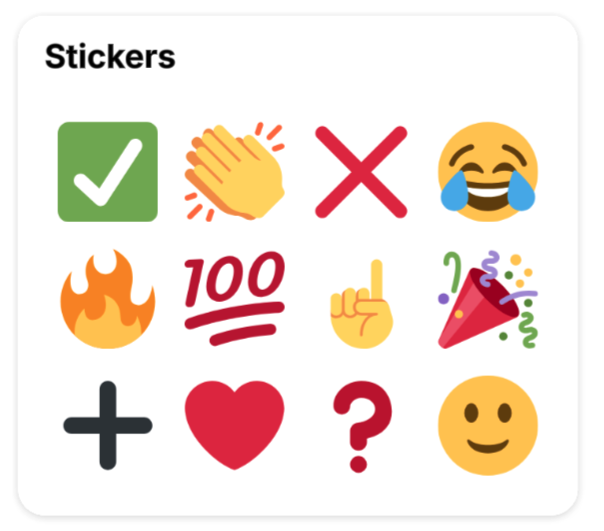
Sticker bank
Add a bank that holds a variety of commonly used emojis.
Dot bank
Add a bank that holds dots of all different colors, which are perfect for assigning out collaborator colors to facilitate a voting session.
Lucid Card bank
Add a bank from which you can grab a limitless number of blank Lucid Cards.
Story points
The shapes in this bank use a modified fibonacci sequence that is popular with agile teams. Drag a story point shape from the shape bank onto a Lucid Card to automatically update its estimation value.
- This shape bank is available to all Lucid users, but the ability to drag a story point shape onto a Lucid Card to change its estimation value is only available to Enterprise users.
T-shirt sizes
The shapes in this bank help you visualize a quick initial estimate to a task or project to help with prioritization and planning. Drag a t-shirt size shape from the shape bank onto a Lucid Card on the canvas to automatically update its estimation value.
- This shape bank is available to all Lucid users, but the ability to drag a t-shirt size shape onto a Lucid Card to change its estimation value is only available to Enterprise users.
- Using t-shirt size shapes to automatically update a card's estimation value is only available for generic Lucid Cards. It is not supported for cards created through an integration.
Profile shapes bank
Add a shape bank that includes your profile shape and a blank profile shape. You can also add profile shapes for additional collaborators.
Custom shape bank
Add a custom shape bank that starts out as empty on your document. You can select and drag one or many objects to the bank at once. It can hold up to 25 objects.
- Rearrange the objects in the shape bank by clicking and dragging them to a new position.
- Remove an object from the custom shape bank by right-clicking and selecting Delete shape bank item.
Tip: In Lucidchart, you can drag any shape library from the left panel onto the canvas to use it as a quick shape bank.
Customize sticky note banks
After you’ve added and selected a sticky note bank to the canvas, you can edit various style options in the shape editing bar in Lucidspark or in the right panel in Lucidchart, such as:
- Fill color
- Corner roundedness
- Font
- Text color
-
Collaborator colors
- When toggled on, the fill color of sticky notes dragged on to the canvas matches each user’s assigned collaborator color.
- Horizontal sticky notes
- When toggled on, sticky notes double in size horizontally providing more space for text.
Customize story point shape banks
If your team uses custom story points or only wants to see certain options in the story point shape bank, you can edit options by following these steps after adding a story point shape bank to the canvas:
- Select a story point shape bank on the canvas.
- Click the advanced options icon from the shape editing bar.
- In Lucidchart, click Edit story points. If the right panel is open, this option is at the top of the panel.
- Customize the shape bank using the following options:
- Change story point values using the dropdown menus or by typing a custom numeric value.
- Rearrange story point values using
the six-dot icon to the left of each dropdown menu.
- Edit the shape color using
the Line color icon.
- Remove a story point value using
the trash can icon to the right of each option.
- Add an additional story point value by clicking + Add item at the bottom of the panel.
- Click Save.
Give feedback on this article
Have feedback about this article? Tell us about your experience here.